How to Set Up Email & Ad A/B Testing Systems Using AI

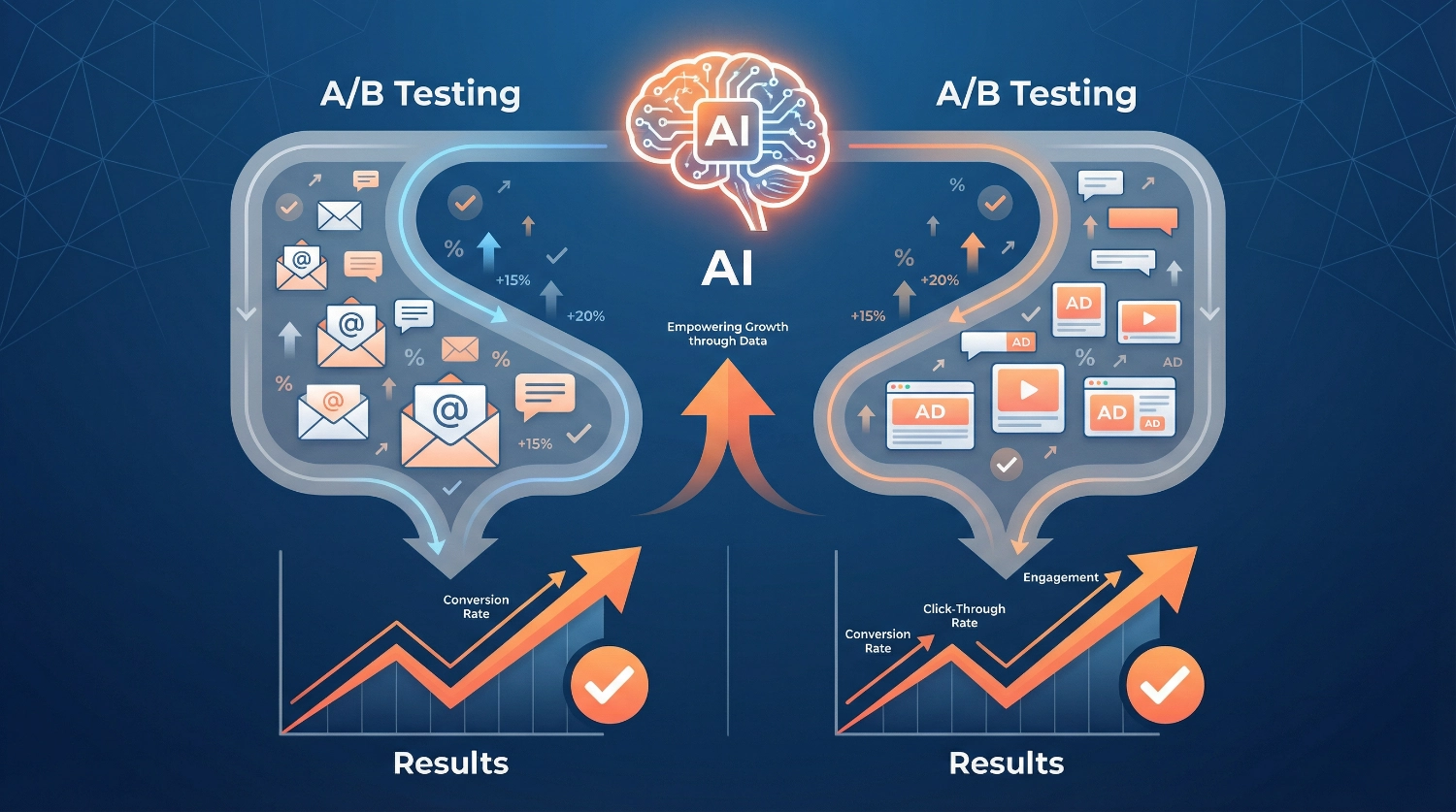
How to Set Up Email & Ad A/B Testing Systems Using AI transforms guesswork into data-driven decisions, helping you understand what truly resonates with your audience. We’ve seen countless marketers waste time manually tracking variants or trusting their gut instead of letting artificial intelligence reveal what actually works. The beauty of modern A/B testing systems is that they don’t require you to be a data scientist—AI handles the heavy lifting while you focus on creativity and strategy.
Whether you’re running email campaigns to nurture leads or crafting ads to drive conversions, setting up an intelligent testing framework is easier than you might think. In this guide, we’ll walk you through the complete process, from choosing the right tools to interpreting your results with confidence.
What Is A/B Testing, and Why Does AI Make It Better?
A/B testing (sometimes called split testing) is simply showing two different versions of something to your audience and measuring which performs better. Think of it as a scientific experiment for your marketing: Version A gets sent to half your audience, Version B to the other half, and you see which one wins.
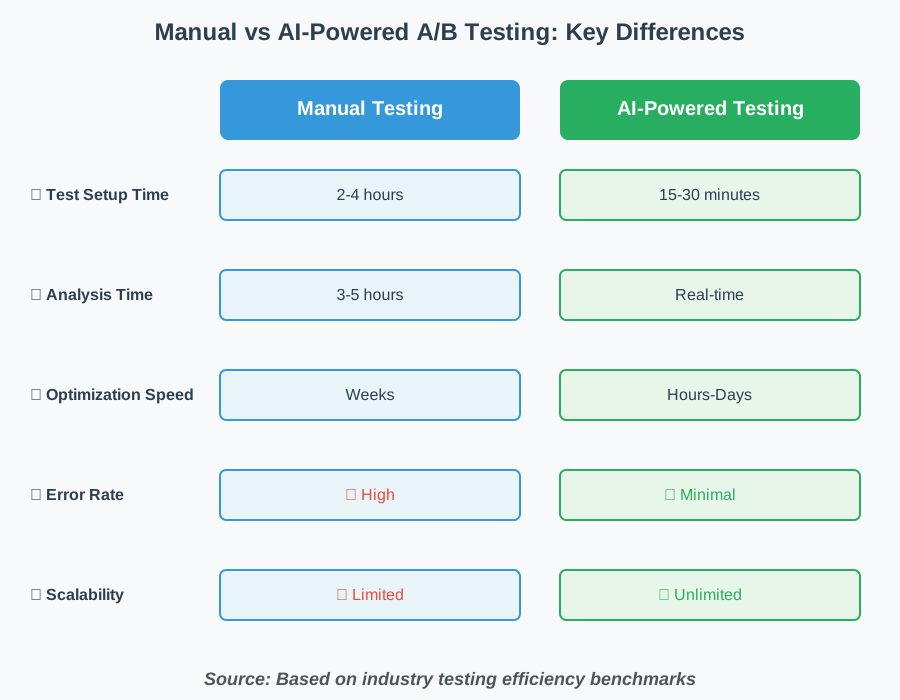
What makes AI such a game-changer here? Traditional A/B testing required you to wait days or weeks for statistical significance, manually calculate sample sizes, and often stop tests too early or let them run too long. AI-powered systems eliminate this friction entirely.
Modern AI testing systems can:
- Automatically allocate traffic to the winning variant in real time
- Predict test duration based on your historical data
- Identify winning patterns across multiple variables simultaneously
- Generate variant suggestions based on what’s working in your niche
- Alert you when a test reaches significance
Instead of babysitting spreadsheets, you’re partnering with intelligent systems that learn from every interaction.
Why Setting Up Proper Testing Systems Matters
Here’s something we learned the hard way: Running occasional random tests doesn’t build organizational knowledge. We once spent six months running email tests without a proper system—no documentation, no priority matrix, and no centralized tracking. When we wanted to understand what worked, we had scattered notes and foggy memories.
A proper testing system using AI creates a learning engine for your business. Each test builds on the last. Patterns emerge. You start to understand your audience at a deeper level.
The difference between amateur testing and systematic testing is like the difference between taking random photos and building a photography portfolio. One is scattered; the other tells a story and improves with time.
Step 1: Define Your Testing Goals and Success Metrics
Before you touch any tools, get crystal clear on what you’re actually trying to improve. This sounds obvious, but we’ve watched people run tests measuring the wrong things, celebrating “wins” that didn’t move the needle on what mattered.
Start by asking yourself:
- What specific outcome am I trying to improve? (Open rates? Click-through rates? Conversions? Revenue per email?)
- What would a meaningful improvement look like? (A 5% lift? 20%? Be realistic but ambitious)
- How will this test help me make future decisions?
For email A/B testing, your primary metrics might include:
- Open rate (for subject line tests)
- Click-through rate (for content and CTA tests)
- Conversion rate (for the complete funnel)
- Unsubscribe rate (to ensure you’re not annoying people)
For ad testing, focus on:
- Click-through rate (CTR)
- Cost per click (CPC)
- Conversion rate
- Return on ad spend (ROAS)
- Cost per acquisition (CPA)
Write these down. Seriously—grab a notebook or open a doc. When your AI testing system asks you to define success, you’ll already know exactly what matters.
Creating Your Testing Priority Matrix
Not all tests are created equal. Some will have massive potential impact; others are nice-to-haves. We use a simple 2×2 matrix:
High Impact, Low Effort: Do these first
- Subject line variations
- Call-to-action button text
- Hero image selection
High Impact, High Effort: Schedule these strategically
- Complete email template redesigns
- New audience segmentation approaches
- Multi-step funnel overhauls
Low Impact, Low Effort: Fill gaps with these
- Font color variations
- Minor copy tweaks
- Button size adjustments
Low Impact, High Effort: Skip these entirely
- Rarely seen footer modifications
- Complex personalization that affects tiny segments
This prioritization keeps you focused on tests that actually move your business forward.
Step 2: Choose Your AI-Powered Testing Platform
The right platform makes everything easier. The wrong one creates frustration and abandoned tests.
We’ve tried dozens of tools, and here’s what actually matters when you’re evaluating AI testing tools:
For Email Testing
Look for platforms that offer:
- Automatic winner selection and traffic allocation
- Integration with your email service provider (ESP)
- AI-generated variant suggestions
- Statistical significance calculations built in
- Historical test tracking and insights
Most modern email platforms like Mailchimp, ConvertKit, and ActiveCampaign have A/B testing built in, but they vary wildly in AI capabilities. Third-party tools like Optimizely or VWO can supercharge testing if you’re serious about optimization.
For Ad Testing
Essential features include:
- Multi-platform support (Facebook, Google, LinkedIn, etc.)
- Automatic budget allocation to winning variants
- Creative testing at scale
- Audience overlap prevention
- Performance prediction algorithms
Tools like Madgicx, Revealbot, and Pattern89 use AI to continuously optimize your ad spend without manual intervention.
Our Recommendation for Beginners
Start with what you already have. If you’re using an email platform or ad manager, explore their native testing features first. Master the basics before investing in sophisticated third-party tools. Once you’ve run 10-15 successful tests and understand the fundamentals, then consider upgrading to AI-native platforms.
Want to make sure you’re not missing critical setup steps? We’ve created a comprehensive resource to help you succeed. Refer to our A/B Testing Setup Checklist that walks you through the complete process of setting up testing systems that actually work. It’s designed to help you avoid the common mistakes we made when starting out.
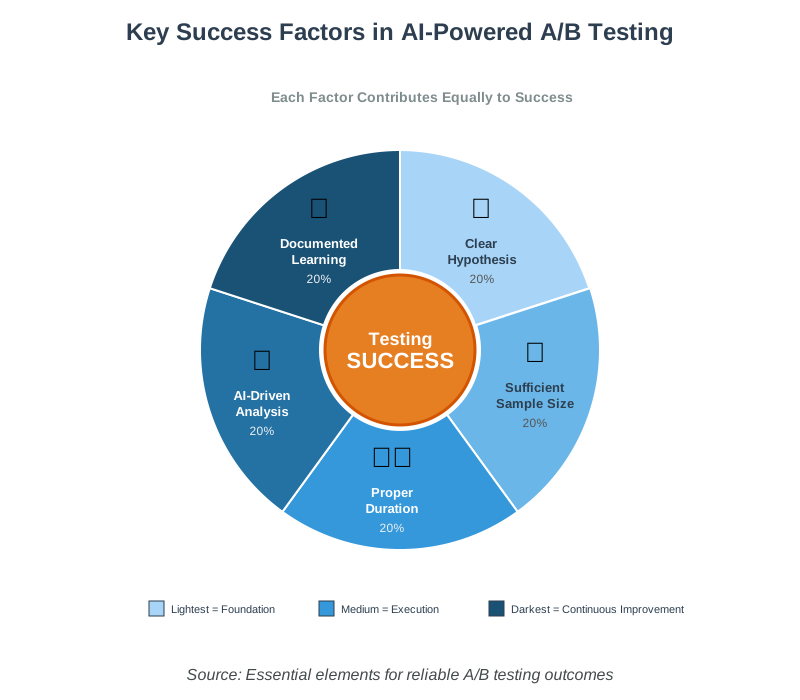
Step 3: Set Up Your Testing Hypothesis Framework
Great tests start with great hypotheses. This is where creativity meets science, and honestly, it’s one of the most enjoyable parts of the process.
A strong hypothesis follows this format:
If we [change this specific element], then [this metric] will [improve by this amount], because [this is our reasoning].Examples:
Weak hypothesis: “Let’s test different subject lines.”
Strong hypothesis: “If we add a specific benefit to our subject line instead of using curiosity alone, then our open rate will increase by 15%, because our audience has shown they prefer knowing what they’ll acquire before opening.”
Weak hypothesis: “Let’s try different ad images.”
Strong hypothesis: “If we show the product in use rather than just the product alone, then our CTR will increase by 10%, because our audience needs to visualize themselves using it.”
See the difference? The strong hypothesis gives you a clear reason for testing, a measurable goal, and a learning opportunity regardless of the outcome.
Using AI to Generate Hypotheses
Modern AI tools can analyze your past campaigns and suggest hypotheses based on patterns.
Here’s how to leverage this:
Step 3.1: Feed your AI tool your historical campaign data (most platforms pull this information automatically)
Step 3.2: Ask it to identify underperforming elements (low open rates, poor CTR, high bounce rates)
Step 3.3: Request specific improvement suggestions with reasoning
Step 3.4: Prioritize AI-suggested tests using your impact/effort matrix from Step 1
The beautiful thing about AI-powered hypothesis generation is that it spots patterns you’d miss. Maybe all your emails with numbers in the subject line underperform. Or your ads featuring people convert better than product-only shots. AI finds these insights buried in your data.
Step 4: Create Your Test Variants (The Fun Part!)
Now comes the creative work—actually building the versions you’ll test. This is where AI transforms from helpful assistant to creative partner.
For Email Tests
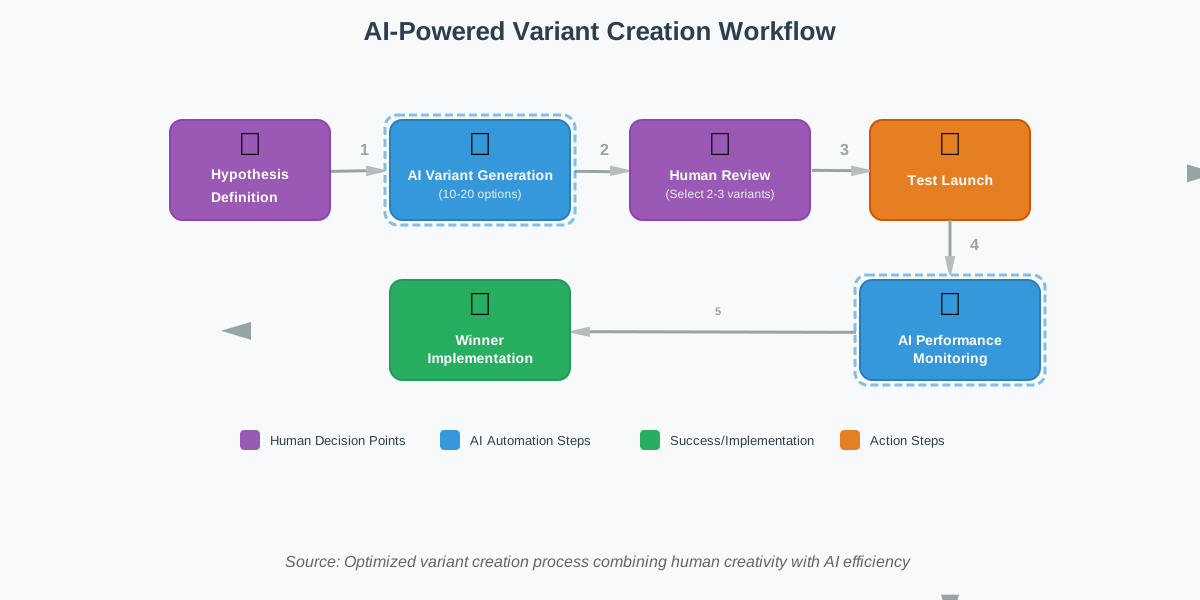
Subject Line Testing: Use AI tools like ChatGPT, Claude, or Copy.ai to generate 10-20 subject line variants based on your hypothesis.
Feed the AI your:
- Target audience description
- Email content summary
- Desired tone and length
- Your winning subject lines from past campaigns
Then select the 2-3 most promising for testing. Don’t test more than 3 variants unless you have a massive list (50,000+ subscribers).
Example prompt for AI:
Generate 15 email subject lines for [your audience] that emphasize [specific benefit].
Make them 40-50 characters, use curiosity without clickbait, and include personalization where possible.
Here are three subject lines that worked well for us in the past: [examples].
Email Body Testing:
When testing email content, change one significant element at a time:
- CTA button text and placement
- Hero image or illustration
- Opening paragraph approach
- Offer presentation
- Personalization depth
AI can help you rewrite sections in different tones, suggest alternative CTAs, or even generate entirely different content angles while maintaining your core message.
For Ad Testing
Visual Testing: Use AI image generation tools (Midjourney, DALL-E, Stable Diffusion) to create variant ad creatives quickly.
One original concept can spawn 5-10 variations testing different:
- Color schemes
- Focal points
- Product angles
- Lifestyle vs. product-only shots
- With or without text overlays
Copy Testing: Test headlines, body copy, and CTAs separately or in combinations. AI copywriting tools excel at generating variations that maintain your brand voice while exploring different persuasion angles.
Practical tip: Create a swipe file of your best-performing ads and emails. When you need new variants, feed these examples to your AI tool and ask it to generate variations “in the style of these winners.”
Step 5: Configure Your Test Parameters and Traffic Allocation
This is where many beginners stumble. You have your variants ready—now you need to set up the test correctly so your results are actually meaningful.
Sample Size and Test Duration
AI platforms typically calculate this automatically, but understanding the basics helps you make better decisions:
For email tests:
- Minimum 1,000 recipients per variant (2,000 total for an A/B test)
- Test duration: Usually 24-48 hours for time-sensitive content, up to 7 days for evergreen content
- Send time: Launch tests at consistent times to avoid skewing results
For ad tests:
- Minimum 100 clicks per variant (more is better)
- Test duration: 3-7 days for stable results, longer for low-volume campaigns
- Budget allocation: Start with even split; let AI adjust after initial data collection
Most AI testing platforms will warn you if your sample size is too small to reach statistical significance. Listen to these warnings! A test with 100 email recipients isn’t telling you anything reliable.
Traffic Allocation Strategies
You have two main options:
1. Fixed Split (50/50 or 33/33/33): Best for beginners or when you have limited traffic. Every visitor is randomly assigned to a variant, and the split stays constant throughout the test.
2. AI-Driven Dynamic Allocation: The system gradually shifts more traffic to the winning variant as confidence grows. This maximizes results during the test itself but requires more sophisticated platforms and higher traffic volumes.
We recommend starting with fixed splits until you’re comfortable with the process. Once you’ve run 10+ successful tests, explore dynamic allocation.
Setting Up Statistical Significance Thresholds
Most AI platforms default to a 95% confidence level, which is perfect for most use cases. This means you’re 95% certain the results aren’t due to chance.
Don’t fiddle with this setting unless you have a good reason. Lowering the threshold to 90% might let you declare winners faster, but you’ll have more false positives. Raising it to 99% makes you more certain but requires much larger sample sizes.
Common mistake to avoid: Stopping tests early because you “see a winner.” Let the test reach its predetermined duration or sample size. AI platforms will alert you when significance is reached—trust the system.
Step 6: Launch and Monitor Your Tests
You’re ready to go live! Here’s how to do it without anxiety.
Pre-Launch Checklist
Before hitting that launch button, verify:
✅ Variants are displaying correctly (send test versions to yourself)
✅ Tracking pixels are firing (test conversions)
✅ Your hypothesis is documented somewhere you won’t lose it
✅ Success metrics are properly configured
✅ Audience segments aren’t overlapping (for ad tests)
✅ You’ve set a test end date or sample size goal
Email-specific checks:
- Preview on mobile and desktop
- Test all links work
- Check spam score
- Verify personalization tokens populate correctly
Ad-specific checks:
- Review ads on all placements (feed, stories, sidebar, etc.)
- Confirm targeting parameters
- Check bid strategy aligns with test goals
- Verify conversion tracking
Monitoring During the Test
This is where AI really shines. Instead of obsessively checking dashboards every hour (we’ve all done it), let the AI monitoring handle the heavy lifting.
What you should check:
- Daily performance snapshots (takes 2 minutes)
- Any alerts from your AI platform about anomalies
- Whether the test is on track to reach significance by your end date
What you shouldn’t do:
- Make changes mid-test (you’ll invalidate your results)
- Show the results to your team and debate calling it early
- Start planning your next test based on incomplete data
Set up automated alerts so the AI platform notifies you when:
- Statistical significance is reached
- Something is clearly underperforming and wasting budget
- Technical difficulties arise (broken links, tracking failures, etc.)
Most modern platforms offer Slack or email notifications—use them. We once missed a test completion because we were “too busy” to verify, and our AI could have told us days earlier that we had a clear winner.
Step 7: Analyze Results and Extract Insights
Your test is complete, and you have data. Now comes the fun part—understanding what it means.
Reading Your Results
AI platforms present results in dashboards, but here’s what to look for:
Primary metrics:
- Which variant won (obvious)
- By how much (lift percentage)
- Statistical confidence level
- Sample size for each variant
Secondary insights:
- Segment-level performance (did it work differently for different audience groups?)
- Time-based patterns (did one variant perform better at certain times?)
- Correlation with other metrics (did higher CTR lead to conversions, or just clicks?)
Going Beyond “A Won”
The real value of testing isn’t just picking winners—it’s understanding why they won. This is where AI analysis tools become invaluable.
Ask your AI platform (or feed the data into ChatGPT/Claude if your platform lacks this feature):
- “What patterns do you notice in our winning variants?”
- “How does this result compare to our previous tests?”
- “What should we test next based on these findings?”
AI can identify patterns across dozens of tests that would take you hours to spot manually. Maybe all your winning emails have a question in the subject line. Or your best-performing ads show products in use rather than isolated. These insights inform your entire marketing strategy.
Documenting Your Learning
Create a testing database or spreadsheet tracking:
- Test hypothesis
- Variants tested
- Winner and lift percentage
- Key insights
- Next steps
This becomes your marketing knowledge base. Over time, you’ll spot meta-patterns that transform your campaigns.
If you want to accelerate your learning and avoid the trial-and-error we went through, grab our 100+ AI Marketing Prompts collection. It includes ready-to-use prompts for analyzing test results, generating hypotheses, and creating variant copy—all proven by solo entrepreneurs, creators, and agencies. These templates help you implement what you’ve learned from testing immediately, without starting from scratch.
Step 8: Implement Winners and Plan Your Next Test
Winning tests means nothing if you don’t implement what you learned.
Rolling Out Your Winner
For email campaigns:
- Update your email templates with winning elements
- Apply insights to future campaigns
- Share learnings with your team
- Consider testing the same hypothesis with different audience segments
For ads:
- Pause losing variants to stop wasting budget
- Allocate saved budget to winning variants
- Create new variants building on winning elements
- Apply successful messaging to other platforms
Creating a Testing Calendar
Successful testing isn’t random—it’s systematic. We maintain a quarterly testing calendar that includes:
Month 1: High-impact, foundational tests (subject lines, primary CTAs, hero images)
Month 2: Segmentation and personalization tests
Month 3: Advanced tests (funnel sequences, timing, complex variants)
This approach ensures we’re always learning and building on previous insights.
Avoiding Test Fatigue
Don’t test everything all the time. Your audience can tell when you’re constantly experimenting, and it can diminish trust. We follow the 80/20 rule: 80% of our emails and ads use proven approaches; 20% are tests.
This keeps your campaigns effective while you continue optimizing.
Common Mistakes and How to Avoid Them
We’ve made every mistake in the book. Here are the big ones to watch out for:
1. Testing Too Many Variables at Once
The mistake: Changing the subject line, CTA, images, and copy all in one test.
Why it hurts: You’ll never know which change drove the results.
The fix: Test one variable at a time, or use multivariate testing with AI that can isolate the impact of each element (requires massive traffic).
2. Calling Tests Too Early
The mistake: Seeing a 10% lift after 6 hours and declaring victory.
Why it hurts: Early results often disappear as more data comes in. You’re seeing noise, not signal.
The fix: Set your test duration and sample size up front. Don’t peek! If you must check progress, use AI platforms that show you confidence levels in real time.
3. Ignoring Statistical Significance
The mistake: Choosing winners based on “best performance” without checking if the difference is statistically meaningful.
Why it hurts: You’re acting on random variation, not real improvement.
The fix: Only implement changes when your AI platform confirms statistical significance (usually 95%+ confidence).
4. Testing Without a Clear Hypothesis
The mistake: “Let’s just try some different subject lines and see what happens.”
Why it hurts: Even if you discover a winner, you don’t understand why it won, so you can’t replicate the success.
The fix: Always document your hypothesis before launching. Write down what you expect to happen and why.
5. Not Accounting for External Factors
The mistake: Running an email test during a major holiday or an ad test when your competitor launches a giant sale.
Why it hurts: External factors can skew results, making your data unreliable.
The fix: Avoid testing during unusual periods. If something unexpected happens mid-test, note it in your documentation and consider retesting later.
Frequently Asked Questions About AI A/B Testing
Your Next Steps: From Reading to Doing
You now have everything you need to build an AI-powered A/B testing system that generates real insights and drives measurable improvements. The difference between people who read about testing and people who actually do it comes down to taking that first step.
Here’s our challenge to you: Choose one campaign—email or ad—and commit to running your first test this week. Not next month. This week.
Start simple:
- Pick one metric to improve
- Write a clear hypothesis
- Create two variants using AI assistance
- Set up your test with proper sample size
- Let it run to completion
- Document what you learn
Remember, the goal isn’t perfection—it’s progress. Your first test probably won’t be your best. But it will teach you more than reading ten more articles ever could.
The testing systems we’ve built over the years started with a single subject line test that barely reached significance. But we learned. We iterated. We improved. Now testing is woven into everything we do, and our conversion rates show it.
The AI tools are ready. The platforms are accessible. The only missing ingredient is your commitment to start.
Before you begin, make sure you’re set up for success. Our A/B Testing Setup Checklist includes a complete testing setup section that ensures you don’t miss any critical steps. And when you’re ready to level up your variant creation, the 100+ AI Marketing Prompts collection gives you ready-to-use templates for every testing scenario we’ve covered in this guide.
Your audience is waiting to show you what works. All you have to do is ask them—through systematic, intelligent testing.
Now go build something amazing.
About the Authors
This article was written through the collaboration of Alex Rivera and Abir Benali for howAIdo.com.
Alex Rivera (Main Author) is a creative technologist who specializes in helping non-technical users harness AI for content generation and marketing optimization. Alex believes AI should feel like a fun, empowering creative partner rather than an intimidating black box, and he brings this philosophy to every tutorial and guide.
Abir Benali (Co-Author) is a friendly technology writer dedicated to making AI tools accessible to everyday users. Abir focuses on clear, jargon-free explanations and actionable step-by-step instructions that anyone can follow, regardless of their technical background.
Together, we combine creative experimentation with practical clarity to help you succeed with AI-powered marketing systems.