How to Plan Conversion‑Focused Video Schedules Using AI

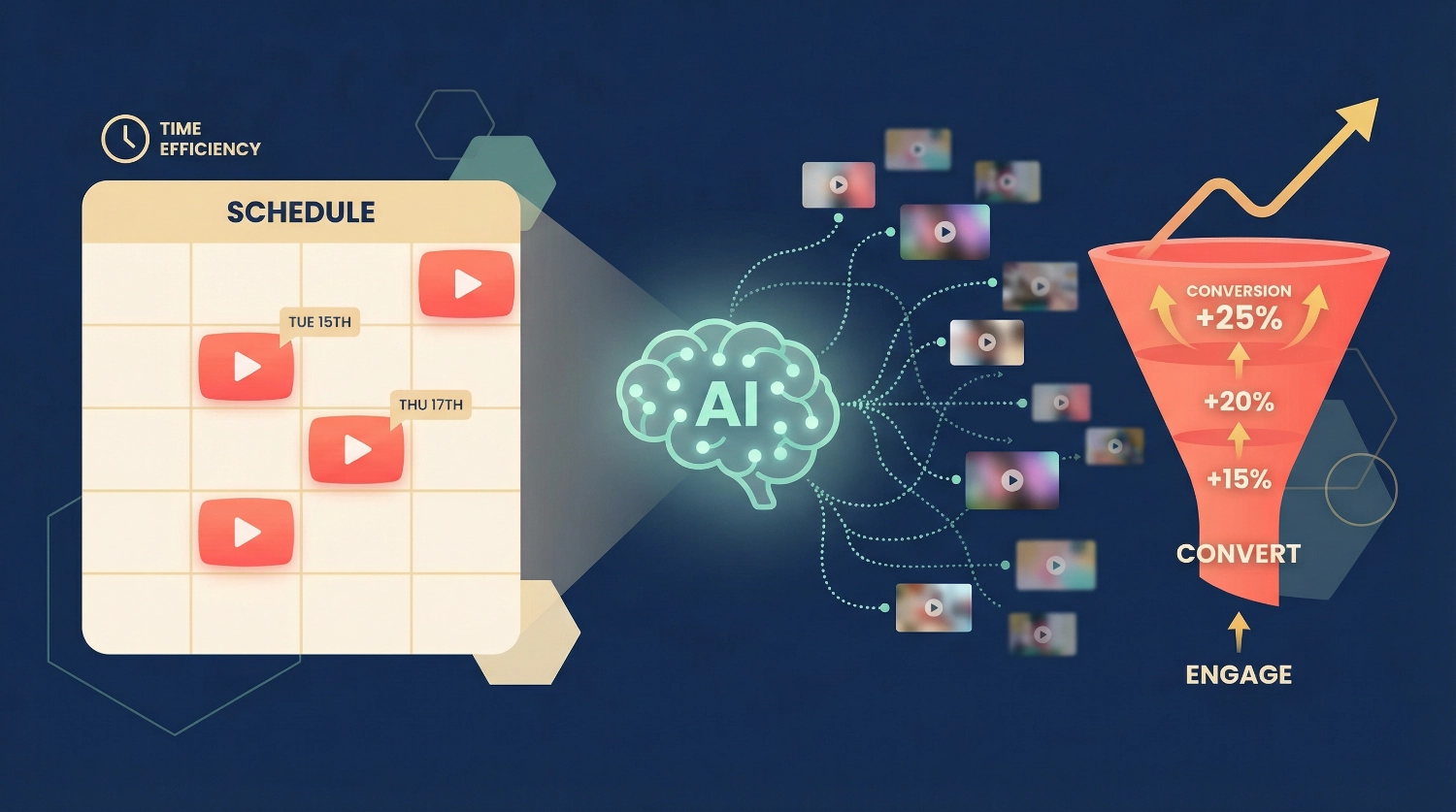
How to Plan Conversion‑Focused Video Schedules Using AI starts with understanding that consistency plus strategy equals results. I’ve spent countless hours manually planning video content, wrestling with spreadsheets, second-guessing posting times, and wondering if my content actually moves viewers toward action. Then I discovered AI could do the strategic heavy lifting while I focused on creativity.
The truth is, random posting doesn’t drive conversions. Neither does posting frequently without purpose. What works is a carefully crafted schedule where each video serves a specific role in your viewer’s journey—and AI can help you build that schedule faster than you ever thought possible.
Whether you’re a solo creator, small business owner, or content manager, this guide walks you through the exact process of using AI to plan conversion‑focused video schedules that turn viewers into customers, subscribers into advocates, and casual scrollers into engaged community members.
Why Video Scheduling Strategy Matters for Conversions
Before we dive into the how, let’s talk about why strategic scheduling transforms results.
I used to post videos whenever I finished editing them. Sometimes three in one week, then nothing for two weeks. My analytics looked like a roller coaster, and my conversion rates? Even worse. The problem wasn’t my content quality—it was the lack of strategic timing and content sequencing.
Conversion‑focused video schedules solve three critical problems:
Audience Momentum: When you post strategically, each video builds on the previous one, creating a narrative arc that guides viewers toward taking action. Random posting breaks that momentum.
Trust Building: Consistent scheduling with intentional content types (educational, social proof, CTA) establishes reliability. Viewers start expecting your content and trusting your recommendations.
Algorithmic Favor: Platforms reward consistent posting patterns with better reach. AI helps you maintain that consistency without burnout.
The difference between content creators who convert and those who don’t often comes down to this: strategic scheduling that treats every video as part of a larger conversion ecosystem.
Step 1: Define Your Conversion Goals Before AI Planning
Here’s where most people stumble—they jump straight into AI without clarity. I learned this the hard way when my first AI-generated schedule produced 30 videos that got views but zero conversions.
Start by identifying your specific conversion goal:
- Email list signups
- Product purchases
- Service bookings
- Course enrollments
- Community memberships
- Affiliate link clicks
Write this down. Be specific. “Get more subscribers” is too vague. “Increase email list signups by 100 in 30 days through video CTAs” gives AI (and you) something concrete to work with.
Then map your viewer journey: What does someone need to know, feel, or believe before they convert?
For example, if you’re selling a course, viewers might need to:
- Understand the problem (awareness videos)
- See the solution is possible (transformation/case study videos)
- Trust you can help (expertise/social proof videos)
- Feel urgency or desire (benefit-focused videos)
- See the clear next step (CTA videos)
Once you have this clarity, AI can help you build a schedule that addresses each stage systematically rather than randomly.
Step 2: Choose the Right AI Tools for Video Schedule Planning
Not all AI tools excel at content scheduling. Through testing various platforms, I’ve found certain tools work best for specific aspects of video schedule planning.
For Initial Schedule Framework: Use ChatGPT, Claude, or Gemini with specific prompts. These conversational AI tools help you map out the big picture—content themes, video types, and optimal frequency based on your goals.
Sample prompt:
I'm planning a 90-day video schedule for [your niche].
My conversion goal is [specific goal]. I can create 3-4 videos weekly.
Help me design a conversion-focused schedule that includes: 40% educational content, 30% engagement/community building, 20% social proof/testimonials, and 10% direct CTA videos.
Suggest themes for each week that build toward my conversion goal.
For Content Idea Generation: Tools like Jasper AI, Copy.ai, or even ChatGPT can brainstorm specific video topics once you have your framework. Feed it your weekly theme, and it’ll generate 10-20 video ideas you can choose from.
For Optimal Posting Time Analysis: While AI can suggest general best practices, combine it with your actual platform analytics. YouTube, TikTok, and Instagram all provide audience activity data.
Ask AI to analyze patterns:Based on these activity times [paste your data], when should I schedule my CTA videos versus educational content?
For Batch Planning and Organization: Notion AI, ClickUp’s AI features, or even Google Sheets with AI plugins help you organize, track, and adjust your schedule as you go. These tools remember your preferences and can suggest adjustments based on performance.
The key is using AI as a strategic partner, not a replacement for your judgment. You bring the authentic voice and audience understanding; AI brings speed, pattern recognition, and tireless brainstorming capacity.
Step 3: Create Your Video Content Categories with AI Assistance
Conversion‑focused video schedules require intentional content variety. Think of it like a well-planned meal—you need different nutrients, not just dessert every day.
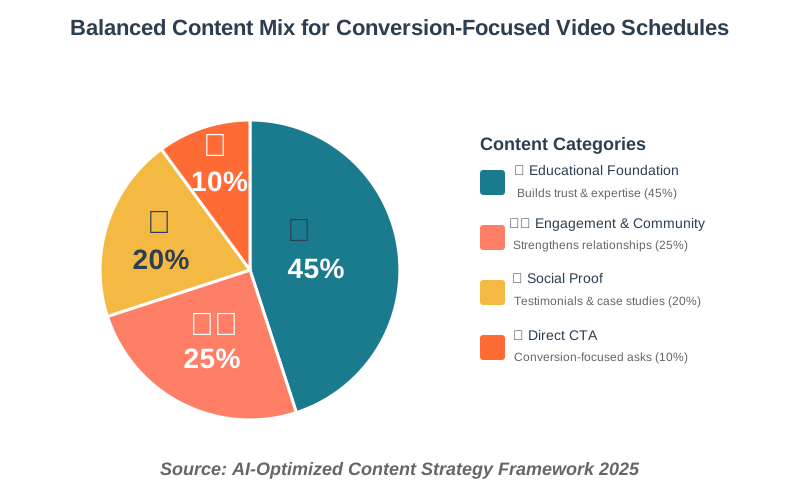
Work with AI to establish four-to-six core content categories that serve different purposes in your conversion funnel:
Educational Foundation Videos (40-50% of schedule) These build trust and establish expertise without asking for anything. AI can help you identify what your audience needs to learn before they’re ready to convert.
Prompt example:
What are the top 10 questions someone needs answered before [desired action]? Turn each into a video topic with a compelling title.Engagement & Community Videos (20-30% of schedule)
These strengthen relationships—Q&As, behind-the-scenes, day-in-the-life content, polls, and challenges. AI is excellent at suggesting engagement formats that work for your niche.
Social Proof Videos (15-20% of schedule) Testimonials, case studies, transformation stories, before/afters. These remove doubt and build confidence. AI can help you structure these stories for maximum impact and suggest which success stories to feature when.
Direct CTA Videos (10-15% of schedule) Product showcases, service explanations, limited offers, and enrollment deadlines. These explicitly ask for the conversion. AI helps you space these appropriately so you don’t over-ask while still maintaining conversion momentum.
Collaboration & Cross-Promotion Videos (Optional 5-10%) Partner interviews, guest expert content, and community spotlights. These expand reach and add fresh perspectives. AI can identify ideal collaboration timing and suggest formats.
Ask AI to create a rotating schedule that balances these categories across your posting frequency. For instance, if you post three times weekly, one week might look like Educational (Monday), Engagement (Wednesday), and Social Proof (Friday).
The next week: Educational (Monday), CTA (Wednesday), and Educational (Friday).
This variety keeps your audience engaged while systematically moving them toward conversion.
Step 4: Build Your 30-90 Day Schedule Framework
Now comes the fun part—actually building your schedule with AI as your strategic assistant.
Start with a 30-day sprint rather than planning six months ahead. Video performance data will inform adjustments, so flexibility matters beyond perfect long-term planning.
Here’s my proven process:
Week 1 – Awareness & Hook Phase: Focus on educational content that solves immediate problems. These videos attract new viewers and establish expertise.
Ask AI:Generate 5 video topics that address common pain points for [your audience] without requiring prior knowledge of my solution.
Example output for a fitness coach might include “3 Desk Stretches That Fix Lower Back Pain in 2 Minutes”, “Why Your Afternoon Energy Crashes (And How to Fix It)” , and “The Sleep Mistake That’s Sabotaging Your Workouts.”
Week 2 – Engagement & Relatability Phase: Mix educational content with engagement videos. This week builds connection.
Ask AI:Suggest 3 behind-the-scenes or day-in-the-life video concepts that humanize my brand while staying relevant to [your niche].
Week 3 – Social Proof & Possibility Phase: Introduce transformation stories and testimonials. Viewers now know you and are ready to see proof your solution works.
AI prompt:Help me structure a case study video showcasing [client result]. Create a 3-act story arc with emotional hooks.
Week 4 – Conversion & CTA Phase: Time for direct conversion asks. By now, you’ve earned the right to sell.
AI prompt:Create 2 video scripts that present my [product/service] as the logical next step for someone who's been following my content. Include soft CTAs and one strong deadline-driven CTA.
This four-week cycle repeats but evolves based on performance data. Maybe Week 5 starts a new theme or doubles down on what worked in Week 1.
Want to implement this faster? Grab our Video Content Strategy Checklist to create strategic video series that build audience and drive conversions. It breaks down exactly what to plan each week, so you’re never wondering “what should I post next?”
Step 5: Use AI to Write Conversion-Optimized Video Descriptions and CTAs
Your schedule is only as effective as your execution—and that includes the copy surrounding each video. AI excels at crafting descriptions and CTAs that convert.
For Each Scheduled Video, Use This AI Workflow:
Generate a Hook-Driven Title:
Write 10 attention-grabbing video titles for a video about [topic].
The title should promise a specific outcome, use power words, and stay under 60 characters.
Target audience: [your audience].
Pick the one that balances curiosity with clarity.
Craft a Value-Packed Description:
Write a YouTube video description for [video topic] that includes: opening hook, key takeaways overview, timestamps for 5 sections, related resources, and two natural CTAs—one mid-description for engagement, one at end for conversion.
Keep it scannable with line breaks.
Create Multiple CTA Variations: Here’s something I learned that changed everything: testing different CTA angles. Don’t use the same “link in bio” for every video.
Ask AI:
Generate 5 different CTA approaches for the same conversion goal [your goal].
Each should use a different psychological trigger: urgency, curiosity, social proof, value-add, and exclusivity.
Example outputs might be:
- “100 people grabbed this checklist yesterday—get yours before we update it.”
- “Curious how top creators plan content? Steal our exact template.”
- “3,200 creators use this framework. See why inside.”
- “I’m including my personal video planning template as a free bonus.”
- “This planning method isn’t for everyone—but if you’re serious about conversions…”
Rotate these approaches across your schedule. What works for your audience might surprise you.
Pro tip: After generating descriptions, always add your authentic voice. AI gives you the structure and strategic elements, but your personality makes it memorable. I usually take the AI draft and add one personal story or insight at the top.
Step 6: Implement Transformation Series and Collaboration Formats
This is where your conversion‑focused video schedule gets really powerful—creating intentional series that guide viewers through complete transformations.
Transformation Series Structure:
A transformation series is 3-7 videos that take someone from problem to solution, building investment with each episode. AI can map these brilliantly.
Prompt:
I want to create a 5-video transformation series helping [target audience] achieve [specific result].
Each video should build on the last.
Give me the arc: video titles, core lesson for each, how they connect, and where to place CTAs.
For example, a social media consultant might get:
- Video 1: “Why Your Content Gets Views But Not Clients” (problem identification)
- Video 2: “The 3-Part Content Framework That Converts” (solution introduction)
- Video 3: “How I Used This Framework to Land 5 Clients in 30 Days” (proof + process)
- Video 4: “Common Mistakes That Kill Conversion (And How to Avoid Them)” (objection handling)
- Video 5: “Your 7-Day Action Plan to Convert Followers Into Clients” (CTA + urgency)
The beauty of this structure? Each video naturally leads to the next, keeping viewers engaged longer and building desire for your solution.
Schedule these series during strategic periods—product launches, seasonal peaks, or when you have bandwidth to engage heavily with comments.
Collaboration Format Integration:
AI can also identify ideal collaboration opportunities and suggest formats that serve both conversion and relationship-building.
Ask AI:
Suggest 5 collaboration video formats for [your niche] that provide value to both audiences while positioning me as an authority. Include how to structure each collaboration for maximum conversion potential.You might get formats like:
- Expert roundtable discussing [trending topic]
- Behind-the-scenes of two creators’ workflows
- Challenge collaboration with clear before/after
- Interview series featuring success stories from your method
- Cross-promotion educational content where you each teach one step
The key is timing these collaborations within your schedule when you need fresh perspectives or expanded reach—typically after you’ve established your core content pattern and before introducing a new offer.
Step 7: Automate Posting and Adjust Based on AI-Powered Analytics
Planning means nothing without execution—and execution at scale requires automation.
Set Up Your Posting Automation:
Tools like Later, Buffer, Hootsuite, or Metricool integrate with AI planning. Here’s my workflow:
- Export your AI-generated schedule to a CSV or directly into your scheduling tool
- Batch-create or upload your videos
- Upload the AI-generated descriptions and CTAs
- Set posting times based on your analytics-informed strategy
- Enable automatic publishing
But here’s the critical part most people miss: automated posting isn’t “set and forget.”
Use AI to Analyze Performance Weekly:
Every week, export your video performance data (views, watch time, clicks, conversions) and feed it to AI with this prompt:
Analyze this video performance data [paste data].
Identify: which content types over-performed, which under-performed, patterns in successful videos, whether my CTA placement is working, and suggest 3 specific adjustments for next month's schedule.
I’ve seen this simple weekly analysis habit improve conversion rates by 40-60% within 90 days because you’re making data-informed adjustments rather than guessing.
Common adjustments AI might suggest:
- Shift CTA videos to different days based on engagement patterns
- Increase frequency of your best-performing content category
- Adjust video length based on audience retention data
- Test different CTA timing within videos
- Identify trending topics to incorporate into future schedules
The combination of AI planning + automated posting + AI analysis creates a feedback loop that continuously improves your conversion rates.
Step 8: Scale Your Schedule Without Sacrificing Quality
Once you’ve validated your AI-planned video schedule works, the question becomes, how do you scale without burning out or diluting quality?
AI helps with three scaling strategies:
Repurposing at Scale: One long-form video can become 10+ short-form pieces.
Ask AI:
Take this video transcript [paste transcript] and identify 8-10 short-form video concepts (30-90 seconds each) that can stand alone. Give me the hook, core message, and CTA for each.Suddenly your weekly video becomes daily content across platforms—all serving your conversion goal.
Template-Based Creation: After your first 30 days, patterns emerge.
Ask AI:
Based on my successful videos [list titles and performance], create 5 reusable video templates I can apply to new topics.
Include: title structure, description framework, optimal length, and CTA placement.
These templates speed up planning dramatically while maintaining quality.
Batch Content Creation with AI Support:
Here’s my monthly workflow:
I dedicate two days to filming, using AI to generate a script outline for 12-16 videos. During editing, I use AI to create descriptions, timestamps, and CTA variations for each. This batching approach, supported by AI tooling, produces a month of scheduled content in two focused days.
The key to successful scaling? Keep your authentic voice and audience connection at the center. AI handles the strategic planning, optimization, and administrative work—you focus on the human elements that build trust and drive conversions.
Looking to master this entire process with proven templates? Check out our 100+ AI Marketing Prompts guide used by solo entrepreneurs, creators, and agencies. It includes ready-to-use prompts for video scheduling, content creation, and conversion optimization—so you can implement these strategies immediately without guessing which prompts work best.
Common Mistakes to Avoid When AI Planning Your Video Schedule
Even with AI assistance, I’ve made (and seen others make) several planning mistakes that sabotage conversions:
Mistake 1: Over-Optimizing for Algorithm, Under-Optimizing for Humans
AI might suggest posting 3x daily because “algorithms favor frequent posting.” But if your audience feels overwhelmed or your quality drops, conversions suffer. Trust your bandwidth and audience preferences over pure algorithmic optimization.
Mistake 2: Treating AI Suggestions as Gospel
AI doesn’t know your specific audience nuances, your brand voice boundaries, or your operational reality. Use AI suggestions as starting points, not mandates. I once followed an AI schedule that had me posting heavy educational content daily—my audience wanted lighter, more entertaining content mixed in.
Mistake 3: Neglecting the “Warm-Up” Phase
Jumping straight to CTA videos without an educational foundation rarely works. Your schedule needs at least 2-3 weeks of value-first content before direct conversion requests feel natural.
Mistake 4: Ignoring Seasonal and Cultural Timing
AI doesn’t automatically know your industry’s busy seasons, holidays, or cultural moments unless you tell it. Always overlay your AI-generated schedule with real-world timing considerations.
Mistake 5: Creating Schedule Rigidity
Trending topics emerge. Opportunities arise. Personal inspiration strikes. Build flexibility into your AI schedule—I typically leave 20% of slots as “flexible” for spontaneous content that feels right in the moment.
Mistake 6: Forgetting to Integrate Cross-Platform Strategy
Planning only for one platform limits conversion potential. Ask AI to create a multi-platform schedule where your YouTube video becomes Instagram Reels, LinkedIn posts, and TikTok content—all coordinated to reinforce the same conversion message.
Frequently Asked Questions
Real-World Implementation: A 90-Day Transformation Case Study
Let me share how Sarah, a wellness coach, used these AI scheduling strategies to transform her video results.
Starting Point (Month 0):
- Posting sporadically when inspiration struck
- 2,000 views per video average
- Zero email signups from video content
- Inconsistent messaging across videos
Month 1 – Foundation Building:
Sarah used ChatGPT to define her conversion goal: 300 new email signups for her free 7-day wellness challenge. We worked with AI to create her content categories:
- 50% Educational wellness content (nutrition basics, stress management)
- 25% Engagement content (Q&As, wellness check-ins)
- 15% Transformation stories (client results)
- 10% Direct CTAs for her free challenge
Using the prompts from Step 2, she generated a complete 30-day schedule in one afternoon. The AI suggested posting three times weekly with specific themes building toward her challenge launch.
Month 2 – Optimization Phase:
After analyzing her first month’s data with AI, we discovered her transformation story videos (which she was nervous about) performed 3x better than generic educational content. AI suggested doubling down on these.
She also learned her audience engaged most on Tuesday and Thursday evenings. The AI helped her restructure her schedule around these peak times, placing CTA videos on Thursdays when engagement was highest.
Month 3 – Scaling and Results:
By month three, Sarah had her system dialed in. She batch-created videos using AI-generated script outlines, automated posting and used AI to create multiple CTA variations for A/B testing.
Results:
- 387 new email signups (29% above goal)
- Average views increased to 5,200 per video
- 73% increase in video completion rates
- Successfully launched her paid program to 42 of those new subscribers
The game-changer? Sarah told me, “I stopped creating videos randomly and started treating each one as a strategic piece in a larger conversion puzzle. AI gave me the structure and confidence to do that consistently.”
Your Next Steps: Implementing Your AI Video Schedule Today
You now have the complete framework for planning conversion‑focused video schedules using AI. But knowledge without action changes nothing.
Here’s your implementation plan starting today:
Today:
Define your specific conversion goal and map your viewer journey (30 minutes). Write these down—clarity here determines everything else.
This Week:
Choose your AI tool and use the prompts from Step 2 to generate your first 30-day schedule framework (2-3 hours). Don’t aim for perfection; aim for “good enough to start.”
Next Week:
Create your first week of videos based on the schedule. Batch if possible. Use AI to generate descriptions and CTAs. Schedule the first three videos.
Ongoing:
Dedicate 30 minutes weekly to reviewing performance with AI and making small adjustments. After 30 days, use AI to analyze your complete month and plan month two with data-informed improvements.
The Biggest Lesson from My Journey:
When I started using AI for video scheduling, I expected the benefit to be time savings. That happened—but the bigger transformation was strategic clarity. I stopped second-guessing what to create and started building intentional pathways to conversion.
Your audience is waiting for consistent, strategic content that guides them toward solutions. AI gives you the framework to deliver that without burning out.
Ready to take this further? Download our Video Content Strategy Checklist for a step-by-step implementation guide, or explore our 100+ AI Marketing Prompts collection to access every prompt mentioned in this article plus dozens more for video optimization, audience analysis, and conversion copywriting.
The tools exist. The strategy works. Now it’s your turn to implement.
What video will you create first? Start with one educational piece that addresses your audience’s biggest pain point. Use AI to structure it. Schedule it. And watch as strategic consistency transforms random views into real conversions.
About the Authors
This article was written as a collaboration between Alex Rivera and Abir Benali.
Main Author: Alex Rivera is a creative technologist who specializes in helping non-technical creators harness AI for content generation and strategy. With a background in digital media production and a passion for making complex tools accessible, Alex has guided hundreds of creators through their first AI-powered content systems. When not experimenting with the latest AI tools, Alex can be found teaching workshops on creative automation and developing beginner-friendly AI resources.
Co-Author: Abir Benali is a friendly technology writer dedicated to explaining AI tools to everyday users without the jargon. Abir believes that technology should empower everyone, not just tech-savvy users, and focuses on creating clear, actionable guides that anyone can follow. With years of experience translating complex technical concepts into simple language, Abir helps bridge the gap between AI capability and practical implementation.
Together, we’re passionate about showing creators that AI isn’t replacing human creativity—it’s amplifying it. Our mission is making sophisticated content strategies accessible to anyone willing to learn, regardless of technical background.