RPA Enhanced by AI: The Smart Automation Revolution

I remember the first time I watched a task that used to take my team three hours complete itself in under five minutes. That moment changed everything I understood about workplace efficiency. Robotic Process Automation (RPA) Enhanced by AI isn’t just another tech trend—it’s the bridge between doing things manually and letting intelligent systems handle the repetitive work while you focus on what truly matters.
If you’ve ever felt buried under routine tasks or watched your team struggle with mundane data entry, you’re about to discover how combining traditional automation with artificial intelligence creates something remarkably powerful. This guide will walk you through everything you need to know about implementing AI-enhanced RPA, from understanding what it is to getting your first intelligent automation running.
What Is Robotic Process Automation (RPA) Enhanced by AI?
Let me break this down in the simplest way possible. Traditional RPA is like having a digital assistant that follows exact instructions—click this button, copy this data, paste it there. It’s fast and reliable, but it can’t think for itself. When something unexpected happens, traditional RPA stops working.
Now, add AI algorithms into the mix, and suddenly your digital assistant becomes intelligent. It can read unstructured documents, make decisions based on context, learn from patterns, and adapt when situations change. That’s Robotic Process Automation (RPA) Enhanced by AI—automation that doesn’t just follow rules but actually understands what it’s doing.
Think of it this way: traditional RPA is like cruise control in your car—it maintains speed but can’t navigate. AI-enhanced RPA is like a self-driving system that adapts to traffic, weather, and road conditions. Both move you forward, but one does it with intelligence.
The Core Components Working Together
When we combine RPA with AI, several powerful technologies work in harmony:
Machine Learning allows your automation to improve over time by learning from past actions and outcomes. Each process execution makes the system smarter.
Natural Language Processing (NLP) enables robots to read and understand emails, contracts, and customer messages just like a human would—but much faster.
Computer Vision gives your automation the ability to “see” and interpret images, PDFs, and scanned documents without needing structured data.
Intelligent Document Processing transforms how you handle paperwork, extracting information from invoices, forms, and reports regardless of their format.
Why AI-Enhanced RPA Matters for Your Business
I’ve worked with dozens of companies transitioning from manual processes to intelligent automation, and the transformation is consistently remarkable. Here’s what happens when you implement AI-powered RPA solutions:
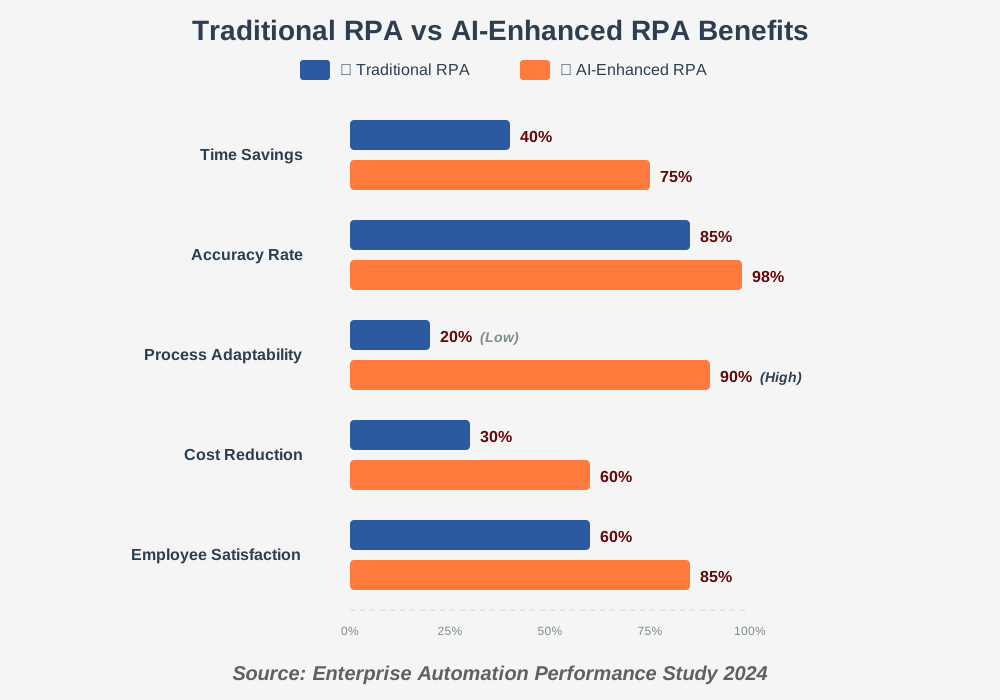
Your team stops wasting time on repetitive tasks. I’ve seen finance departments reduce invoice processing time by 85%, customer service teams respond to inquiries three times faster, and HR departments onboard new employees in days instead of weeks.
But the real magic isn’t just speed—it’s accuracy. Cognitive automation eliminates the human errors that inevitably happen during repetitive work. No more typos in data entry. No more missed fields in forms. No more inconsistent decision-making.
Perhaps most importantly, your employees become happier. Nobody dreams of spending their workday copying data between spreadsheets. When you automate those soul-crushing tasks, people can focus on creative problem-solving, customer relationships, and strategic thinking.
How to Get Started with AI-Enhanced RPA: Step-by-Step Guide
Ready to bring intelligent automation into your workflow? I’ll walk you through the exact process I use when helping businesses implement their first AI-enhanced automation. This isn’t complicated—it just requires a methodical approach.
Step 1: Identify Your Best Automation Candidates
Start by making a list of tasks your team does repeatedly. Look for processes that are:
- Time-consuming and done frequently (daily or weekly)
- Rule-based with clear steps
- Involving structured data like spreadsheets or forms
- Prone to human error
- Keeping your talented people from more valuable work
In my experience, invoice processing, customer inquiry routing, employee onboarding, report generation, and data migration between systems make excellent starting points. Pick one process that’s painful but not mission-critical for your first project. This gives you room to learn without risking essential operations.
Step 2: Choose Your RPA Platform with AI Capabilities
Several excellent platforms offer AI-powered automation tools suitable for beginners. Don’t get overwhelmed by options—focus on platforms that provide:
UiPath offers comprehensive AI features with strong community support and extensive learning resources. Their drag-and-drop interface makes it accessible even if you’re not technical.
Automation Anywhere provides cloud-native solutions with built-in AI capabilities, perfect if you want to avoid infrastructure headaches.
Microsoft Power Automate integrates seamlessly with Office 365 and includes AI Builder for adding intelligence to your workflows—ideal if you’re already in the Microsoft ecosystem.
Blue Prism delivers enterprise-grade security and governance, though it’s typically better for larger organizations.
I recommend starting with a free trial or community edition. Most platforms offer generous free tiers that let you build and test automations without financial commitment. This hands-on experience is invaluable for understanding what the technology can actually do.
Step 3: Map Your Process in Detail
Before automating anything, document exactly how the process works today. Open a document and write down every single step, including:
- What triggers the process to start
- What decisions get made along the way
- Which systems or applications are involved
- What data gets moved where
- How exceptions are currently handled
- What defines success for this task
Be thorough here. I once helped a company that skipped this step, and their automation failed because they forgot about a monthly edge case that appeared in their process. Spending an extra hour on documentation saves days of troubleshooting later.
Walk through the process yourself a few times. Take screenshots. Note where judgment calls happen—these are opportunities for AI to add value.
Step 4: Build Your Basic Automation
Now comes the exciting part. Open your chosen RPA platform and start building:
Create a new automation project using your platform’s visual designer. Most modern tools use flowcharts or drag-and-drop interfaces—no coding required.
Add activities for each step in your process. If you’re automating invoice processing, you might start with “Open email,” then “Download attachment,” then “Extract invoice data.”
Test each activity individually before moving to the next. This incremental approach prevents hours of debugging later. Run each action, verify it works correctly, then add the next one.
Connect your activities with logic flows. Add conditional branches for different scenarios—if the invoice is over $10,000, route it for approval; otherwise, process it automatically.
Don’t try to handle every edge case in your first version. Build the “happy path” first—the straightforward scenario that covers 80% of situations.
Step 5: Add AI Intelligence
This is where your automation transforms from a simple robot into an intelligent assistant. Here’s how to layer in AI capabilities:
For document processing: Add document understanding components that use machine learning algorithms to extract data from invoices, receipts, or forms regardless of their format. The AI learns to recognize fields like dates, amounts, and vendor names even when documents look different.
For email handling: Integrate natural language processing to analyze email content and intent. The AI can categorize inquiries, detect sentiment, and route messages to the right person or trigger appropriate responses.
For decision-making: Implement prediction models that analyze patterns and make recommendations. If you’re processing loan applications, AI can assess risk factors and flag cases needing human review.
For quality control: Add computer vision to verify data accuracy by comparing multiple sources or checking for anomalies that suggest errors.
Most platforms provide pre-built AI models you can drop into your automation. Start with these before attempting to build custom models. They’re tested, reliable, and work immediately.
Step 6: Train and Test Your Intelligent Automation
Your AI-enhanced automation needs training to perform reliably. Here’s how to prepare it for real work:
Feed it sample data—lots of it. If you’re automating invoice processing, provide 50-100 different invoice formats. The AI learns to handle variations by seeing examples.
Run the automation in test mode, checking results carefully. Compare outputs against manually processed examples. Look for patterns in errors and refine your AI models accordingly.
Handle edge cases by training the AI to recognize unusual situations. Add rules for what should happen when the automation encounters something unexpected—should it ask for human help or make its best attempt?
Gradually increase complexity as accuracy improves. Start with straightforward cases, then introduce more challenging scenarios once the basics work perfectly.
I always run parallel processing for the first few weeks—let the automation work alongside your manual process. This safety net catches issues before they impact operations and builds confidence in the system.
Step 7: Deploy and Monitor Continuously
Once testing shows consistent accuracy above 95%, it’s time to go live:
Deploy your automation to production, starting with a limited rollout. Perhaps handle 25% of the volume initially, scaling up as you build confidence.
Set up monitoring dashboards to track key metrics: processing time, accuracy rate, exception frequency, and cost savings. Most RPA platforms include analytics tools that visualize performance automatically.
Establish clear escalation paths for when the automation needs help. Who gets notified? How quickly should they respond? What authority do they have to override automation decisions?
Schedule regular reviews—weekly at first, then monthly. Check if the AI is learning appropriately, if accuracy remains high, and if any new patterns suggest opportunities for improvement.
Remember, intelligent process automation gets better over time. The AI continues learning from each transaction, becoming more accurate and handling more edge cases automatically.
Step 8: Expand Thoughtfully
After your first successful automation, resist the urge to automate everything immediately. Instead:
Document lessons learned from your pilot project. What worked well? What surprised you? What would you do differently?
Identify your next automation candidate using stricter criteria now that you understand the technology better. Look for processes that share characteristics with your successful pilot.
Standardize your approach based on what you’ve learned. Create templates and best practices that make future automations faster to implement.
Build a center of excellence if you’re implementing multiple automations. This could be just two people initially—they’ll ensure quality, share knowledge, and prevent duplicate efforts.
Common Challenges and How to Overcome Them
In my years helping businesses implement cognitive RPA, I’ve seen the same obstacles repeatedly. Here’s how to navigate them:
“Our processes are too complex for automation.” Start smaller than you think necessary. Every complex process contains simpler subprocesses. Automate one piece first, prove the value, and then expand.
“We don’t have technical skills.” Modern RPA platforms are designed for business users, not programmers. If you can create a PowerPoint presentation, you can build a basic automation. Focus on platforms with visual designers and extensive tutorials.
“Change management feels overwhelming.” Include your team early. Let them help choose which processes to automate. Show them how automation eliminates frustration rather than replacing people. I’ve found that resistance melts away when employees see automation as a helpful tool rather than a threat.
“The AI makes mistakes.” Perfect accuracy is unrealistic initially. Set realistic expectations—if your manual process has 90% accuracy, AI achieving 95% is a win. Use confidence scores to route uncertain cases for human review.
“Integration with our legacy systems is difficult.” Most AI-enhanced RPA tools interact with applications through the user interface rather than requiring API access. They literally “see” screens and “click” buttons like humans do, which works even with old systems that lack modern integration capabilities.
Real-World Applications That Deliver Immediate Value
Let me share specific scenarios where AI-enhanced automation creates dramatic improvements:
Finance teams use intelligent invoice processing to handle thousands of invoices daily. The AI extracts data from any format, matches invoices to purchase orders, detects anomalies suggesting fraud, and processes payments automatically—reducing processing time from days to hours.
Customer service departments deploy AI bots that understand customer intent, pull relevant information from multiple systems, and resolve common issues instantly. Complex cases get routed to humans with complete context, making agents more effective.
HR professionals automate candidate screening using AI that analyzes resumes, schedules interviews, conducts initial assessments, and even predicts candidate success—cutting time-to-hire by half while improving quality.
Supply chain operations leverage predictive AI combined with RPA to forecast demand, optimize inventory levels, automate reordering, and adjust quickly when disruptions occur.
Healthcare organizations use intelligent automation for claims processing, reducing errors that cause claim denials while freeing medical staff to focus on patient care.
The pattern is consistent: AI and automation technologies working together handle the repetitive work while enabling people to focus on judgment, creativity, and relationships.
Measuring Your Success
How to know if your AI-enhanced automation is truly working? Track these metrics:
Time savings: Measure hours saved per week or month. This directly translates to capacity for higher-value work.
Error reduction: Compare mistake rates before and after automation. Most organizations see error rates drop below 2%.
Cost per transaction: Calculate the total cost of processing each item. Automation typically reduces this by 50-70%.
Employee satisfaction: Survey your team regularly. Are they happier? Less stressed? More engaged with strategic work?
Customer satisfaction: Monitor whether faster, more accurate processes improve customer experience and loyalty.
Return on investment: Calculate savings against implementation costs. Most AI-enhanced RPA projects achieve positive ROI within 6-12 months.
Set specific targets for each metric before launching your automation. This creates clear success criteria and justifies expansion to additional processes.
Frequently Asked Questions
Your Next Steps: Making This Real
You’ve learned what Robotic Process Automation (RPA) Enhanced by AI can do and how to implement it. Now it’s time to take action. Here’s your concrete path forward:
This week: Identify three repetitive tasks that frustrate your team. Spend 30 minutes observing each process and documenting the steps involved. Ask team members which task they’d most love to eliminate.
This month: Sign up for free trials of two RPA platforms. Most offer comprehensive tutorials—spend a few hours learning the basics. Build a simple automation (even just automating a personal task like organizing files) to understand how the tools work.
Next quarter: Select your pilot project based on what you’ve learned. Start small, but start now. Build your first AI-enhanced automation following the steps in this guide. Document everything you learn.
Remember, the goal isn’t perfection—it’s progress. Every automation you implement frees up time for more meaningful work. Every hour your team spends on strategic thinking instead of data entry compounds over time.
The businesses thriving today aren’t necessarily the ones with the most resources—they’re the ones that embrace intelligent automation to multiply the impact of every person on their team. Technology isn’t replacing human intelligence; it’s amplifying it.
Your journey with AI-enhanced RPA starts with a single process. Pick one. Map it. Automate it. Then watch as efficiency gains cascade through your organization, freeing your team to do the work that truly matters.
The tools are ready. The technology works. The only question is, what will you automate first?
References:
UiPath Documentation: https://docs.uipath.com
Automation Anywhere University: https://university.automationanywhere.com
Microsoft Power Automate Learning Resources: https://learn.microsoft.com/power-automate
Gartner Research on RPA and Intelligent Automation (2024)
Enterprise Automation Performance Study (2024)
About the Author
James Carter is a productivity coach and automation strategist who has helped over 100 businesses implement AI-enhanced RPA solutions. With a background in process optimization and a passion for making technology accessible, James specializes in helping non-technical teams leverage intelligent automation to reclaim their time and focus on meaningful work. He believes that the future of work isn’t about humans competing with machines—it’s about humans and intelligent systems collaborating to achieve what neither could accomplish alone. When he’s not helping organizations automate their workflows, James can be found experimenting with emerging AI technologies and writing about practical ways to boost productivity without technical expertise.